LIBERO#
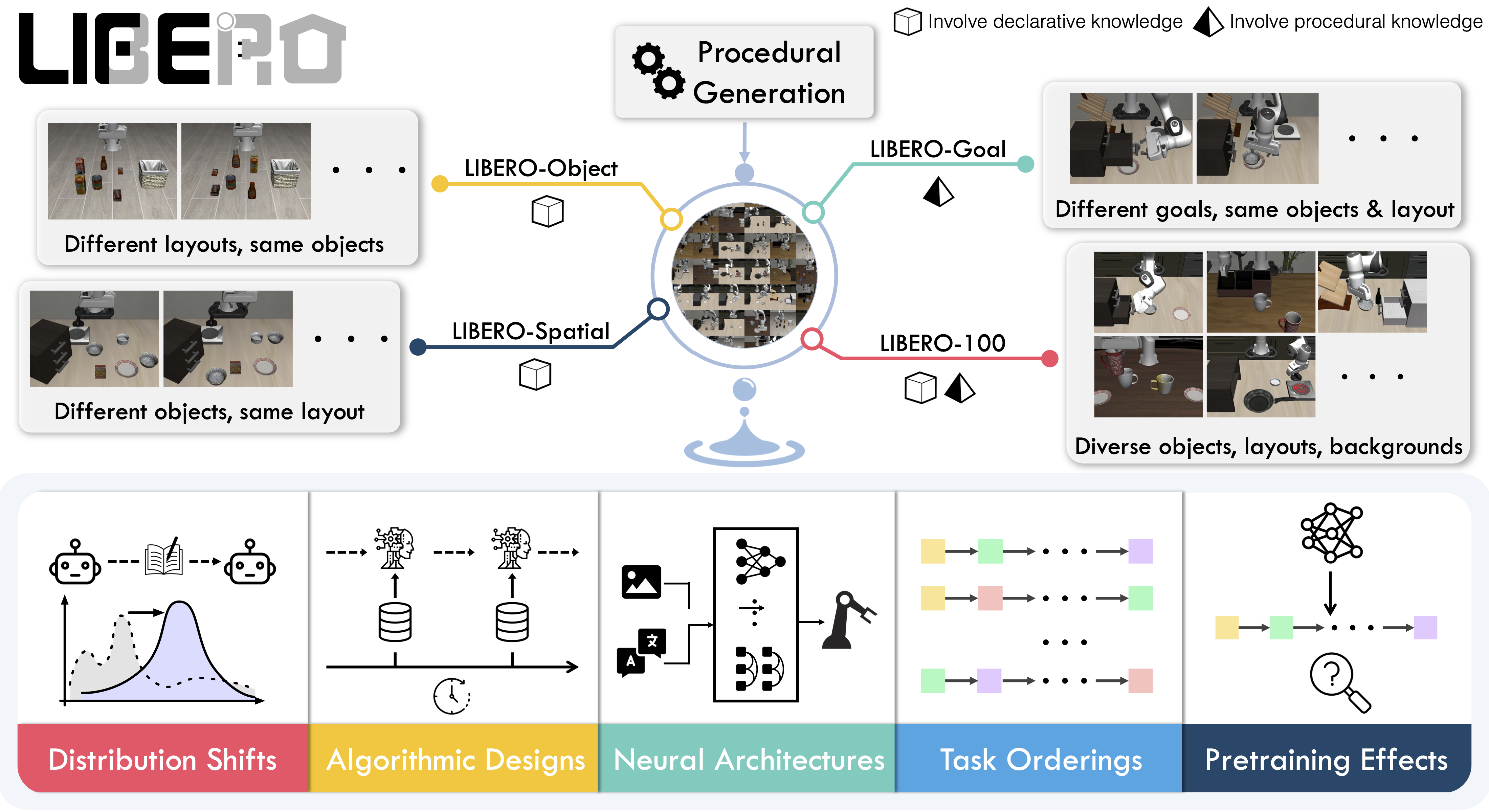
LIBERO benchmark overview. Source: LIBERO project.#
Run tabletop manipulation tasks with RPent in LIBERO, then reproduce LIBERO-PRO experiments. The simulator uses MuJoCo/robosuite. RPent supports the standard, pro, and plus variants and uses Pi0.5 as the default VLA.
Overview#
Check the model, task, and runtime requirements before following the installation and run steps.
Pi0.5
api, claude_code, codex; also see Flash Mode.
Object, Goal, Spatial, LIBERO-10
Linux, NVIDIA GPU; Python 3.11; CUDA and EGL.
Tasks#
This table covers RPent’s four core LIBERO-PRO task families and all of their perturbation suites.
Family |
Base suite |
Perturbation suites |
|---|---|---|
Object |
|
|
Goal |
|
|
Spatial |
|
|
LIBERO-10 |
|
|
Observation and Action#
The table distinguishes planner tools, model inputs, and the environment’s success criterion.
Item |
Description |
|---|---|
Observation |
RGB/depth camera views and end-effector/gripper state. Pi0.5 uses the scene and wrist images with robot state. |
Action |
The planner calls Pi0.5 tools or motion primitives such as |
Reward / success |
Evaluate success using the final state’s top-level |
Task prompt |
The task language comes from the selected suite/task and the current environment. |
Installation and Resources#
For a first LIBERO-PRO run, complete the installation, asset downloads, and model setup in Quick Start. Continue here to select tasks and reproduce experiments.
For another variant, install the matching extra in an isolated environment and download its assets. Install only one LIBERO variant per Python environment:
Variant |
Install |
Assets |
|---|---|---|
|
|
|
|
|
|
|
|
|
At runtime, set --libero-type to match the installed variant.
VLA Configuration#
Download the recommended SFT checkpoint
RLinf-Pi05-LIBERO-130-fullshot-SFT,
then point at it via PI05_CHECKPOINT_PATH:
hf download RLinf/RLinf-Pi05-LIBERO-130-fullshot-SFT \
  --local-dir /path/to/rlinf-pi05-libero-130-fullshot-sft

export PI05_CHECKPOINT_PATH=/path/to/rlinf-pi05-libero-130-fullshot-sft
SAM3 Configuration#
SAM 3.0 segmentation is enabled for every LIBERO run. Download sam3.pt
from Hugging Face: facebook/sam3
or ModelScope: facebook/sam3,
then point at it via SAM3_CHECKPOINT_PATH:
# Hugging Face (request access on the model page first)
hf auth login
hf download facebook/sam3 sam3.pt --local-dir /path/to/sam3

# ModelScope (use this instead of the Hugging Face commands above)
modelscope download --model facebook/sam3 sam3.pt --local_dir /path/to/sam3

export SAM3_CHECKPOINT_PATH=/path/to/sam3/sam3.pt
Task Selection#
A LIBERO run uses the following task settings:
Option |
Meaning |
|---|---|
|
Select a suite from Core LIBERO-PRO suites. |
|
Task index within the suite. |
|
Environment seed; defaults to |
|
Installed LIBERO variant: |
Run a Task#
Complete the model setup above and configure a planner with Planners and Model Services. This command runs task 2 of libero_object_swap at seed 0.
export PI05_CHECKPOINT_PATH=/path/to/rlinf-pi05-libero-130-fullshot-sft

rpent --robot libero \
  --suite libero_object_swap --task 2 --seed 0 \
  --planner claude_code --model claude-opus-4-8
To switch planners, see Planners and Model Services.
View Results#
The terminal shows server startup, planner conversation, and tool calls. After the run, inspect episode.mp4, transcript_*.json, and run.log in the output directory; see Output Files for default paths and step artifacts.
Inspect the final state with view_env_state(step=-1). Its top-level terminated value is the native success result; finish ends planning. See Dashboard for live monitoring.
Task Memory and Exploration Mode#
Use --explore to build local memory or --memory-profile local to read a prepared corpus. See Memory and Exploration for the complete LIBERO workflow and commands. LIBERO’s native success result determines whether successful task records are published.
Experiment Reproduction#
See RPent Leaderboard for the unified RPent model comparison on LIBERO-PRO Task/Swap and the corresponding model configurations.
The GPT-6 Astra suite results cover all eight complete suites and 800 verified episodes: 741 successes, 59 failures, and 92.63% Overall, with Codex / GPT-6 Astra / low / reasoning.
The following historical reproduction records use the reproduce/libero branch with
gpt-5.5 and xhigh reasoning effort:
libero_10_task: 70% (70/100)libero_10_swap: 55% (55/100)
Use the reproduction branch above and complete this page’s resource setup. The example selects task 0, seed 0; reproducing the reported score requires the full task and seed coverage. Start services at the example ports using Remote Services and Parallel Runs first.
Reproduction command:
rpent --robot libero \
  --suite libero_10_task --task 0 --seed 0 \
  --planner codex \
  --model gpt-5.5 --reasoning-effort xhigh \
  --max-turns 100 \
  --planner-timeout-s 5000 \
  --max-episode-steps 10000 \
  --libero-type pro \
  --vla-endpoint http://127.0.0.1:8220 \
  --sam3-endpoint http://127.0.0.1:8114
What Runs Where#
LIBERO separates simulation and model inference into services. The toolkit uses their clients to execute the planner’s requests.
env_server (
robots/libero/env_server.py) — owns the LIBERO MuJoCo env and EGL rendering. Exposesreset,step,chunk_step,render_camera,get_camera_meta, … over an RPC transport (HTTP by default; socket via--transport socket).vla_server (
rpent/robots/components/pi05_vla_server.py) — owns the Pi0.5 weights. Exposespredictover the same RPC transport (HTTP or socket).sam3_server (
rpent/robots/components/sam3_server.py) — loads SAM 3.0 and segments a target region from a text description or one pixel on the target object. If the model produces multiple candidates, it selects the one with the highest model score and returns its mask as a compressed PNG through the same RPC transports (HTTP or socket).toolkit (
robots/libero/toolkit.py) — defines the tools the LLM can call:pi0_pick(fed to Pi0.5),move_to,rotate_wrist,back_project,view_env_state,finish, …
Tools the Planner Can Call#
LIBERO tools fall into two groups: physical action tools and read-only tools.
Physical action tools:
pi0_pick(prompt, ...)— use Pi0.5 to execute a closed-loop grasp.pi0_doubled(prompt, ...)— use Pi0.5 for a non-pick contact action.move_to(xyz, ...)— move the end effector to a world-frame position.move_pose(xyz, target_pitch=..., target_yaw=..., ...)— move position and orientation together.rotate_wrist(target_yaw=... / delta_yaw=..., ...)— rotate wrist yaw to an absolute target or by a relative amount.rotate_pitch(target_pitch=... / delta_pitch=..., ...)— tilt the gripper to an absolute pitch or by a relative amount.set_gripper(gripper=..., steps=...)— hold the pose and drive the gripper for a fixed number of steps.release(...)— open the gripper.
Physical action tools advance the environment and record new state and images.
Read-only tools:
back_project(row, col, ...)— back-project an image pixel to world coordinates.segment(prompt=... / point=..., ...)— use SAM3 to segment an existing image with a text or point prompt.view_env_state(step=-1)— read a recorded state and its embedded observation images. Step0is initial;-1is latest.view_camera_meta(camera=..., step=-1)— read camera metadata for a recorded step. Step-1is latest.finish(status, summary)— end the current run.
These tools do not advance the environment.
Dashboard#
See Dashboard to monitor runs, submit tasks, and stop a session.
Bringing Your Own VLA#
If you have a LIBERO-compatible VLA that is not Pi0.5, swap the model client without touching the robot by:
Writing a new
vla_server.pythat exposes the samepredictRPC contract (over HTTP or socket).Pointing at it with
--vla-endpoint [protocol://]host:port.Optionally updating
robots/libero/toolkit.pyif the tool surface (e.g.pi0_pick→mymodel_pick) needs to change.
See Add an Action Primitive for the full walkthrough.