Architecture and Execution#
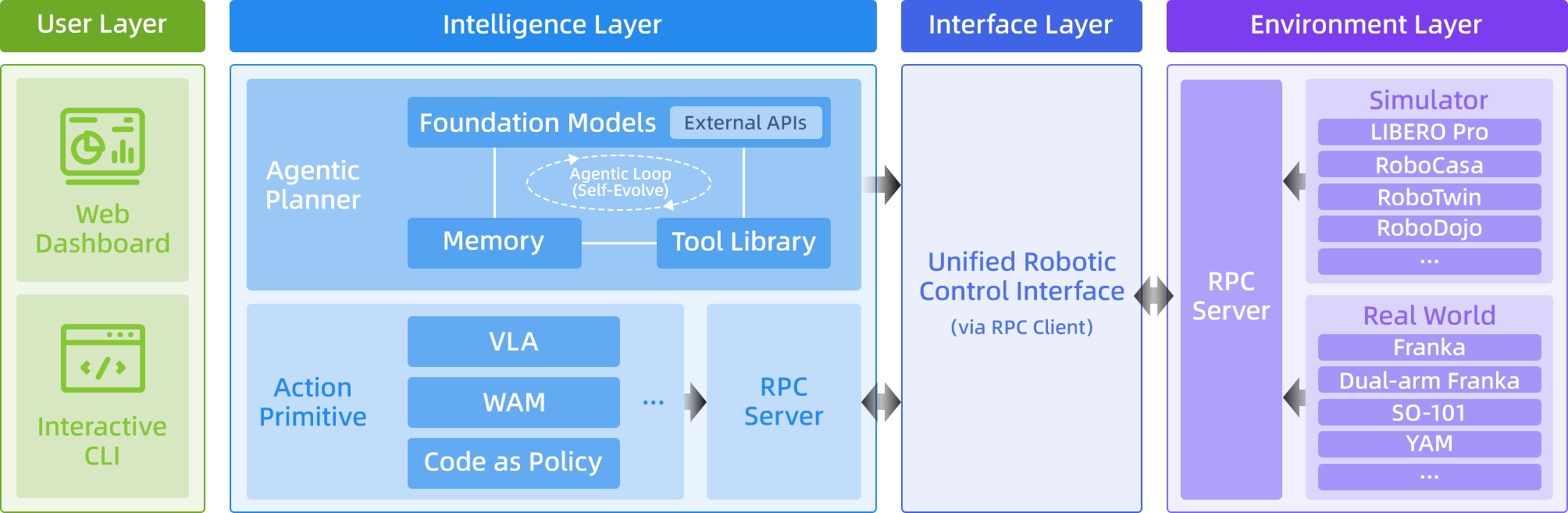
RPent separates task planning, tool execution, and environment operation. The planner chooses tools, the toolkit dispatches them to perception or action components, and the environment returns updated state. Environments connect to the shared runner through RobotSpec.
Task Execution#
The runner prepares the task and its services before handing control to the planner. During execution, each tool result supplies the observations used for the next decision. The sequence below follows one run from CLI setup to cleanup.
The CLI reads shared arguments, loads the environment selected by
--robot, and registers and validates its arguments.parse_configcreates aRunConfigwith the task, output directory, and prompt variables.The runner synchronizes or uses local memory according to the profile, constructs the planner, and renders prompts.
init_runtimestarts or connects to services and returns runtime inputs and owned processes;get_toolkitcreates tools and their memory manager.The planner obtains schemas through
get_tools_spec, dispatches calls throughexecute_tool, and consumes text and image results.Action tools call a VLA or scripted motion. The environment records updated state and observations for the next planning turn.
finish, a run limit, or an error ends planning. The runner saves the transcript, finalizes recordings, and cleans up. Environments that publish evaluation artifacts use their finalization hook.
finish marks the end of planning; success comes from the environment or a real-robot operator. See each environment guide for its criterion. The main entry point is rpent/cli/main.py.
Component Responsibilities#
The toolkit connects planning to environment-specific actions. Model services and the environment retain their own state, while the runner manages their lifetime. This division lets a planner use the same tool interface across different robots.
Component |
Responsibility |
|---|---|
Planner |
Select tools, manage model interaction, and return |
Toolkit |
Define schemas, dispatch calls, record state, and expose results as |
Environment service |
Own the simulator or robot connection, execute actions, and expose native state and success information. |
VLA / perception services |
Load models for action prediction, segmentation, and other capabilities selected by the environment. |
MemoryManager |
Control memory reads and exploration writes, and manage merging and indexing. |
In LIBERO, the environment, Pi0.5, and SAM3 run in separate service processes. Action tools advance the environment; read tools such as view_env_state inspect recorded state. RPC supports HTTP and socket transports. See Core Interfaces for contracts and Remote Services and Parallel Runs for standalone deployment.
Repository Layout#
Shared execution and interfaces live under rpent/. Each package under
robots/ supplies the environment-specific implementation described above.
rpent/
  cli/          # CLI, Dashboard launcher, memory commands
  planner/      # Model backends and Planner protocol
  prompt/       # Shared prompt construction
  session/      # Session and task lifecycle
  dashboard/    # Web UI and event delivery
  robots/       # Discovery, descriptors, runtime components
  tools/        # Toolkit and shared tool behavior
  memory/       # Memory permissions, merge, and indexing
  evaluation/   # Evaluation result support
robots/
  libero/
  robocasa/
  robotwin/
  franka/
  dual_franka/
Environment Discovery#
enumerate_robots in rpent/robots/base.py discovers packages under robots/. The CLI uses that result for --robot choices. Selecting myrobot lazily imports robots.myrobot. Its package entry exposes two factories:
def get_robot_spec() -> RobotSpec: ...

def get_toolkit(*, runtime_kwargs, dashboard_events, config): ...
RobotSpec declares prompts, CLI arguments, run configuration, service startup, and optional Dashboard and exploration capabilities. get_toolkit receives the run configuration and constructs tools; some environments accept additional mode or state-directory arguments. See Core Interfaces for contracts and Add a Robot or Simulator for integration steps.
Dashboard Sessions#
The Dashboard uses a long-lived Session to manage services and creates a TaskRun for each task. DashboardSpec defines task commands, cameras, controls, and runtime components marked shared or unique.
A LIBERO Session reuses Pi0.5 and SAM3, while each sequential TaskRun owns its environment, toolkit, and planner conversation. The owning session or task cleans up its components.
The browser receives session updates through server-sent events (SSE) at
/api/session/stream and fetches transcript events as they become available.
It uses those updates to refresh the conversation, camera views, and action
timeline. Direct primitive controls use the schemas declared by the robot;
the backend validates their arguments before dispatching the tool call. See
Dashboard for usage and Add a Robot or Simulator for Dashboard integration.
Extension Guides#
Choose the guide for the component you want to extend.
Goal |
Guide |
|---|---|
Connect an environment, robot, or Dashboard control. |
|
Expose an action or perception capability as a tool. |
|
Add a planning backend. |
|
Understand memory access and persistence. |